
Download Transparent Screen Lock SMART – screen locker, transparent screen lock, secure computer, Windows security, remote desktop, Windows Hello, smart card, Windows credentials, Group Policy, multiple authentication
Overview
Transparent Screen Lock SMART (TSL-SMART) is a productivity-focused utility designed to enhance the security of Windows-based systems without disrupting user workflow. Its primary purpose is to provide a secure yet transparent method of locking a computer screen while preserving visibility of open applications and active sessions. This functionality is especially valuable in shared computing environments such as offices, libraries, or public terminals, where users need to step away briefly but must maintain the integrity of their work. By allowing continuous visibility of the screen while preventing unauthorized access, TSL-SMART balances convenience with robust protection.
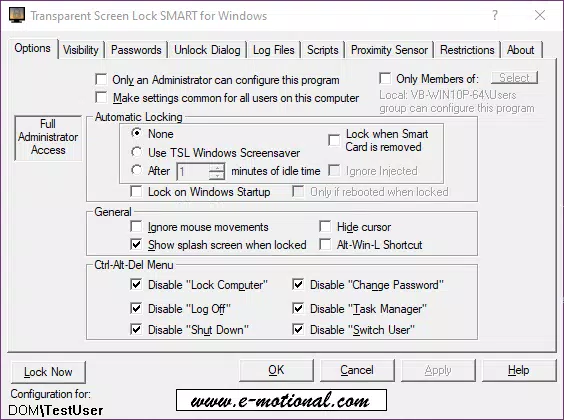
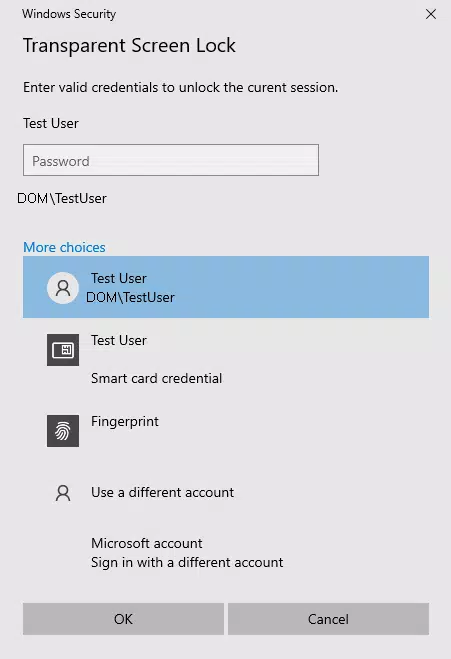
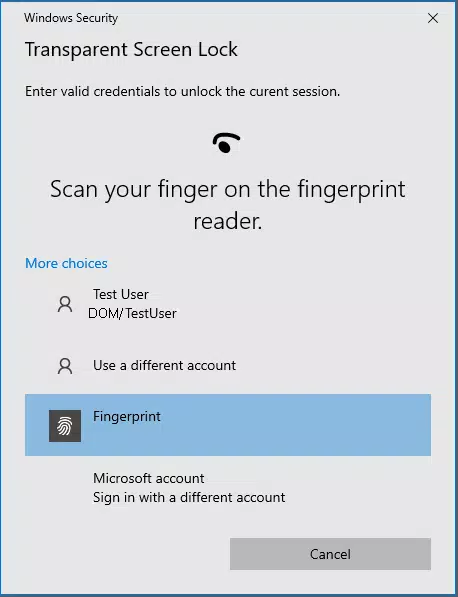
The app is tailored for both individual users and IT administrators managing multiple systems. It supports a range of authentication methods, including Windows text passwords, Smart Cards, and biometric options via Windows Hello such as fingerprint and facial recognition. This flexibility ensures accessibility across different user profiles and security requirements. The software’s compatibility with Group Policy Objects enables centralized management, making it a strong candidate for enterprise deployment. Its long-standing presence since 2002 underscores its reliability and enduring relevance in the Windows security ecosystem.
Real-world use cases include temporary absences during work hours, shared workstations in educational institutions, and secure remote desktop sessions. The ability to lock the screen instantly via hotkey or desktop icon ensures immediate protection without requiring complex steps. The developer did not provide additional technical details beyond the provided information.
Key Features & Functionality
- Multiple Authentication Methods: Users can unlock the system using Windows credentials, Smart Cards, or Windows Hello biometrics. This adaptability supports diverse user preferences and security policies, enhancing both usability and protection.
- Remote Management via Group Policy: Administrators can configure and enforce settings across multiple devices through Group Policy Objects, streamlining deployment and ensuring consistent security across an organization.
- Automatic Screen Locking: The software can be set to lock automatically after a period of inactivity, mimicking traditional screensavers, or triggered instantly via a hotkey or desktop icon, ensuring real-time security.
- Remote Desktop Compatibility: TSL-SMART functions seamlessly within remote desktop environments, allowing users to view their remote sessions while preventing unintended interactions, which is critical for secure remote work.
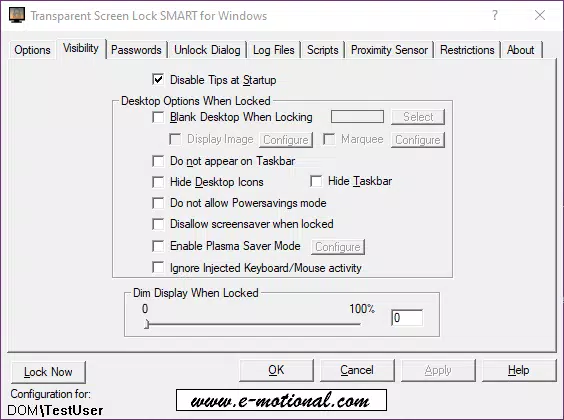
- Non-Intrusive Design: The transparent lock screen overlays the current desktop without obscuring open windows, enabling users to monitor running processes or ongoing tasks while the system remains locked.
For example, a librarian can step away from a public terminal, knowing their open research tabs remain visible but inaccessible. An employee working remotely can lock their session with a single keystroke while still viewing their remote desktop. These use cases highlight how TSL-SMART enhances both security and productivity in practical scenarios.
Interface, UX & Performance
The user interface of Transparent Screen Lock SMART is minimal and focused on functionality. It operates primarily in the background, with no complex onboarding or dashboard. The transparent overlay appears seamlessly when the screen is locked, preserving the visual context of the desktop without interruption. Navigation is intuitive, relying on familiar Windows interaction patterns such as hotkeys and desktop icons for activation.
Although the developer did not list formal performance metrics, the app’s lightweight design—only 2.5 MB in size—suggests efficient resource usage. It is designed to run smoothly on standard Windows systems without causing noticeable lag or memory overhead. The software maintains responsiveness during lock and unlock cycles, ensuring that users experience minimal delay when returning to their session.
Stability appears to be a key strength, supported by over two decades of continuous use. The app integrates well with Windows security mechanisms and does not interfere with existing authentication workflows. Specific requirements were not listed, but its compatibility with modern Windows versions is implied by its current release date.
Platform Compatibility & Technical Requirements
Transparent Screen Lock SMART is available exclusively for the Windows platform. It supports the latest versions of Windows operating systems, though specific OS requirements were not fully disclosed by the developer. The software has a file size of 2.5 MB, indicating a lightweight footprint suitable for both older and modern hardware.
Version 1.5.1 was released on April 2, 2024, reflecting ongoing maintenance and updates. The app is free to download and install, making it accessible to individual users and organizations alike. The developer did not specify minimum OS requirements or hardware specifications, but its long-standing presence suggests broad compatibility with mainstream Windows environments.
Pros and Cons
- Lightweight design with minimal system impact
- Supports multiple authentication methods including biometrics
- Seamless integration with Group Policy for enterprise management
- Non-intrusive transparent lock screen preserves workflow visibility
- Free to use with no in-app purchases or ads
- Specific system requirements were not listed
- Only available for Windows, not cross-platform
- No mobile or cloud-based features included
- Developer did not provide detailed documentation or support channels
- Limited visibility into update frequency or long-term development roadmap
FAQ
Is Transparent Screen Lock SMART safe to use?
Yes, the app uses native Windows security mechanisms for authentication, including Windows Hello and Smart Cards, ensuring secure access without storing sensitive data locally.
Can I use this app on older versions of Windows?
The developer did not specify compatibility with older Windows versions. However, its long history suggests it may work on widely used versions, though this is not confirmed.
Does Transparent Screen Lock SMART work with Remote Desktop?
Yes, it is explicitly designed to function in remote desktop environments, allowing users to view their remote sessions while preventing unauthorized interaction.
Is there a mobile version of this app?
No, Transparent Screen Lock SMART is only available for Windows and does not have a mobile or iOS counterpart.
How often is the app updated?
The latest version, 1.5.1, was released on April 2, 2024. The update frequency is not publicly documented, but the developer continues to maintain the software.
Final Thoughts
Transparent Screen Lock SMART stands out as a reliable, lightweight tool for securing Windows workstations in both personal and professional settings. Its unique transparent locking mechanism offers a practical solution for users who need to step away from their computers without losing visibility of ongoing tasks. The support for multiple authentication methods and integration with Group Policy make it a valuable asset for IT administrators managing shared environments.
While the lack of detailed technical documentation and limited public information on updates may raise questions for some users, the app’s proven track record over more than 20 years speaks to its stability and effectiveness. For individuals seeking a secure, free, and easy-to-use screen locker, or organizations looking for a manageable solution for shared workstations, TSL-SMART delivers tangible value.
Download Transparent Screen Lock SMART now


